Tools - The Hands of AI
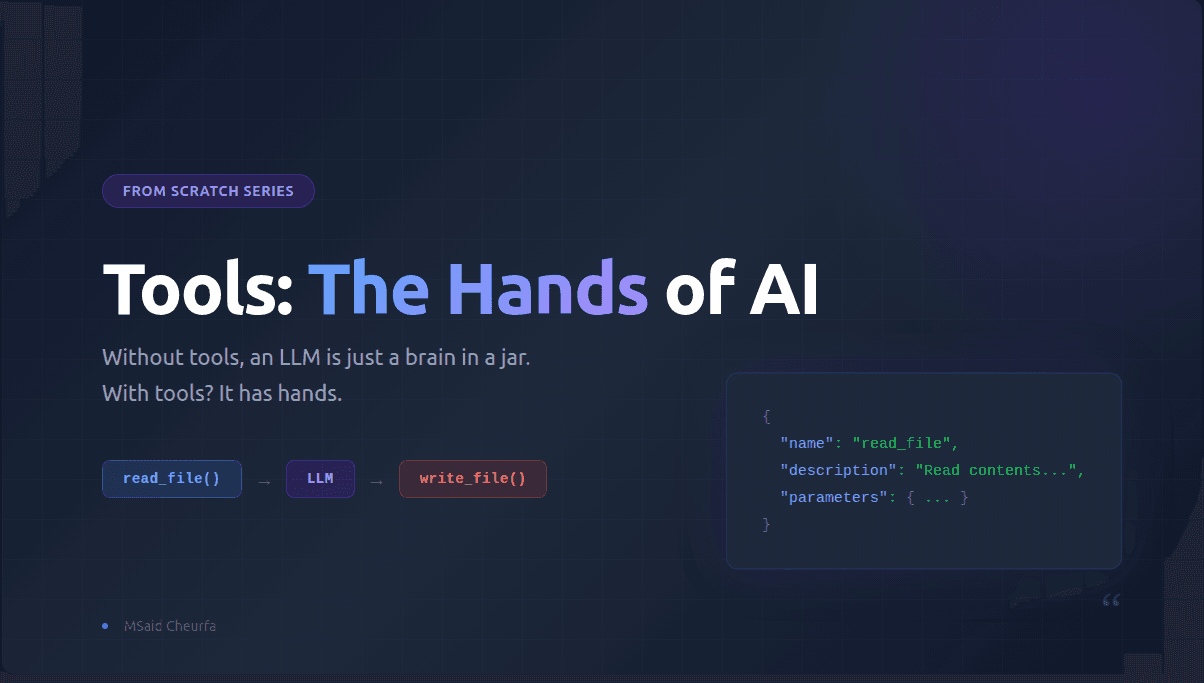
Aristotle said something that stuck with me. He didn't say humans are the smartest beings because we have hands. He said we're the smartest because we know how to use them well.
That's exactly what's happening with AI right now. The models are getting smarter, sure. But the real leap? It's not the brain . it's the hands. It's the tools.
The most important component of any agentic system is not the model. It's the tools. Without tools, there is no context. No action. No agent.
The Problem: A Brain Without Hands
Here's the thing about LLMs. They're incredibly powerful text generators. They can write poetry, debug code, explain quantum physics. But at their core, they have one fundamental limitation:
Their knowledge is frozen in time.
An LLM is trained on a static dataset. Once training is done, that's it. The model doesn't know what happened yesterday. It can't read your codebase. It can't query your database. It can't execute a single line of code. It has no access to the real world — no eyes, no ears, no hands.
Imagine being the smartest person alive, but locked in a room with no internet, no phone, no windows. You can think. You can reason. But you can't do anything. That's an LLM without tools.
As the team at DecodingAI puts it: "LLMs have a fundamental limitation: they are trained on static datasets and cannot update their knowledge or interact with the external world on their own." [1]
And from Mercity: "LLMs on their own are simply text-generation machines, very powerful, but they lack proper context." [4]
So the question becomes: how do we give hands to the brain?
Look Around: Tools in Action
Before we dive into how tools work, look at what they've already built.
Claude Code — an AI that lives in your terminal, reads your entire codebase with grep, read, glob tools, executes bash commands, edits files, runs tests, and ships code. It's not magic — it's an LLM with the right tools. Without file system tools and a bash sandbox, Claude Code would just be a chatbot. With them, it's a software engineer.
Manus — an agent that browses the web, scrapes data, creates slide decks, builds spreadsheets, and delivers complete research reports. How? Tools. Web scraping tools, file creation tools, browser interaction tools. The model is smart, but the tools are what let it do things.
Claude Desktop with MCP servers — connect it to your Gmail, your Google Drive, your Slack, your database, and suddenly it can read your emails, draft responses, query your data, and organize your work. Not because the model got smarter — because you gave it more tools.
Sure, other components matter: context engineering, the underlying LLM quality, software engineering patterns, sandboxing, memory. But tools are the bottleneck capability. Without tools, none of these agents would exist. The model would be trapped in its training data, generating text into the void.
Tools are what separate a chatbot from an agent.
The Concept, In One Sentence
Tool calling is beautifully simple. Here it is:
Instead of generating text, the model generates a JSON object containing the name of a function and the arguments to pass to it. Then your code executes that function.
That's it. That's the whole concept.
The model doesn't run anything itself. It decides what to call. You execute it. You give the result back. And the model uses that result to give you a proper answer.
Think of it like a senior engineer and an intern. The senior engineer (the LLM) says: "I need to see the authentication module — go read the file at src/auth/middleware.py." The intern (your code) goes, reads the file, and brings back the content. The senior engineer then says: "I see the issue — the token validation is missing a clock skew tolerance."
This isn't magic. It's a conversation loop with a very specific structure.
The 5-Step Flow
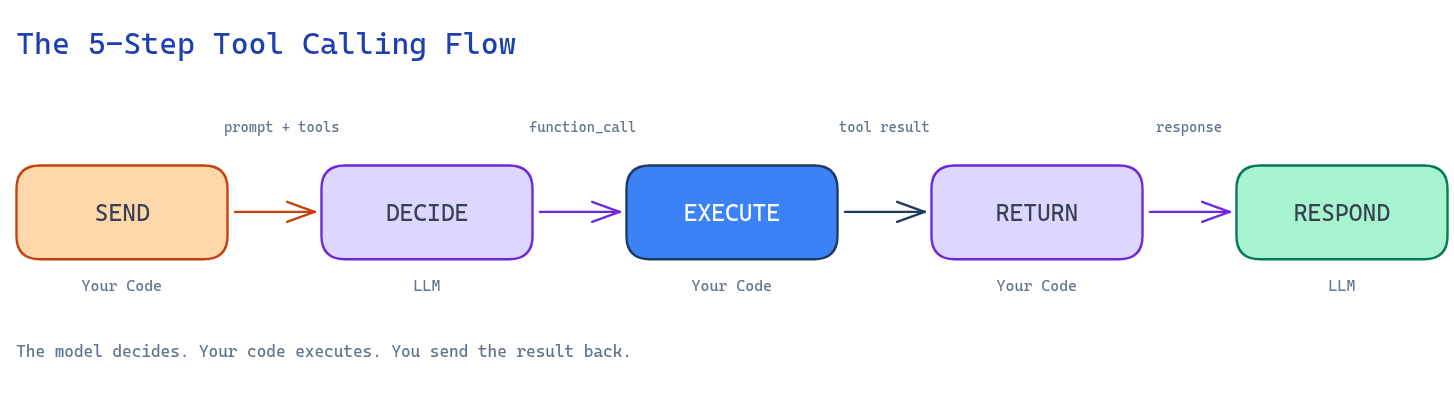
Let's break down the cycle step by step:
Step 1 — You send the task + tool definitions to the LLM. You give the model the user's question, along with a list of available tools. Each tool is described by a JSON schema — its name, what it does, and what parameters it accepts.
Step 2 — The LLM decides to call a tool. Instead of answering directly, the model outputs a structured function_call: the tool name and the arguments, all in clean JSON. For example: {"name": "read_file", "args": {"path": "src/auth/middleware.py"}}.
Step 3 — You parse the JSON and execute the function. Your code reads the function call, finds the matching Python function (or API endpoint, or bash command), runs it with the provided arguments, and captures the result.
Step 4 — You send the result back to the LLM. You take the function's output — say, the actual file contents — and feed it back into the conversation as a new message.
Step 5 — The LLM generates the final response. Now the model has the actual data. It combines its reasoning with the tool result and gives the user a natural, helpful answer.
Key point: The model never runs the tool itself. It only decides which tool to call and with what arguments. Your code does the actual execution. This is a critical design choice — it keeps the model safe, controllable, and auditable. [1][2][3]
From Scratch: Let's Build It
Enough theory. Let's build tool calling from scratch — no frameworks, no magic, no @tool decorators hiding what's really happening. Just raw Python so you can see every moving part.
Step 1: Define Your Tools as Python Functions
We'll use realistic tools — the kind an actual coding agent would have:
def read_file(path: str) -> str:
    """Read the contents of a file at the given path."""
    with open(path, "r") as f:
        return f.read()

def grep_code(pattern: str, directory: str) -> list:
    """Search for a regex pattern across all files in a directory."""
    import subprocess
    result = subprocess.run(
        ["grep", "-rn", pattern, directory],
        capture_output=True, text=True
    )
    return result.stdout.splitlines()[:20]

def list_files(directory: str) -> list:
    """List all files in a directory recursively."""
    import os
    return [
        os.path.join(root, f)
        for root, _, files in os.walk(directory)
        for f in files
    ][:50]
Notice what matters here: the function name is clear, the type hints tell you what goes in and comes out, and the docstring explains what the function does. These three things are what the LLM will use to understand your tool. They're not optional — they're the whole point.
Step 2: Define the JSON Schema for Each Tool
The schema is the contract between your code and the LLM. It tells the model: "Here's what this tool is called, here's what it does, and here's what it needs from you."
{
    "name": "read_file",
    "description": "Read the full contents of a file at the given path. Use this when you need to understand what a specific file contains.",
    "parameters": {
        "type": "object",
        "properties": {
            "path": {
                "type": "string",
                "description": "Absolute or relative file path, e.g. src/auth/middleware.py"
            }
        },
        "required": ["path"]
    }
}
This is the industry-standard format. OpenAI uses it. Google uses it. Anthropic uses it. Once you understand this schema, you understand how every major provider does tool calling. [1][2][3]
anatomy-of-a-tool.excalidraw
Step 3: Create the Tool Registry
A simple dictionary that maps tool names to their handlers and schemas:
TOOLS = {
    "read_file": {
        "handler": read_file,
        "schema": read_file_schema,
    },
    "grep_code": {
        "handler": grep_code,
        "schema": grep_code_schema,
    },
    "list_files": {
        "handler": list_files,
        "schema": list_files_schema,
    },
}

TOOLS_BY_NAME = {name: tool["handler"] for name, tool in TOOLS.items()}
TOOLS_SCHEMAS = [tool["schema"] for tool in TOOLS.values()]
Nothing fancy. Just a lookup table so that when the model says "read_file", you know exactly which function to run.
Step 4: Write the System Prompt
The system prompt tells the LLM how to use the tools. It includes the tool definitions and specifies the output format:
SYSTEM_PROMPT = """
You are a coding assistant with access to file system tools.

When you need to use a tool, output ONLY the tool call in this exact format:
<tool_call {"name": "tool_name", "args": {"param1": "value1"}} </tool_call

Available Tools:
<tool_definitions>
{tools}
</tool_definitions>
"""
Step 5: The Call Loop
Now put it all together:
import json

# User asks a question
user_message = "Find the authentication middleware and explain how tokens are validated"
messages = [SYSTEM_PROMPT.format(tools=TOOLS_SCHEMAS), user_message]

# Step A: Send to LLM — it decides to search first
response = llm.generate(messages)
# Model outputs: <tool_call {"name": "grep_code", "args": {"pattern": "auth.*middleware", "directory": "src"}} </tool_call

# Step B: Extract tool call from response
tool_call_str = response.text.split("<tool_call ")[1].split(" </tool_call")[0]
tool_call = json.loads(tool_call_str)

# Step C: Execute the function
tool_name = tool_call["name"]
tool_args = tool_call["args"]
result = TOOLS_BY_NAME[tool_name](**tool_args)

# Step D: Send result back — model now decides to read the file
messages.append(f"Tool result from {tool_name}: {json.dumps(result)}")
response = llm.generate(messages)
# Model outputs: <tool_call {"name": "read_file", "args": {"path": "src/auth/middleware.py"}} </tool_call

# Repeat the cycle...
tool_call_str = response.text.split("<tool_call ")[1].split(" </tool_call")[0]
tool_call = json.loads(tool_call_str)
result = TOOLS_BY_NAME[tool_call["name"]](**tool_call["args"])

messages.append(f"Tool result: {json.dumps(result)}")
final_response = llm.generate(messages)

print(final_response.text)
# "The authentication middleware validates tokens by..."
See what happened? The model didn't just call one tool — it chained them. First it searched for the file, then it read it. That's the power of tool calling. The model decides the sequence. Your code just executes each step and feeds the results back.
No LangChain. No AgentSDK. No magic decorators. Just five moving parts: a function, a schema, a registry, a prompt, and a call loop.
Why build from scratch? Because frameworks abstract away exactly the parts you need to understand. When your agent calls the wrong tool in production, you need to know why. When the model hallucinates a function name that doesn't exist, you need to know where to look. Understanding the raw mechanics is what separates someone who uses AI tools from someone who builds them. [1]
Read vs Write: The Two Types of Tools
Every tool falls into one of two buckets. Understanding this distinction is fundamental.
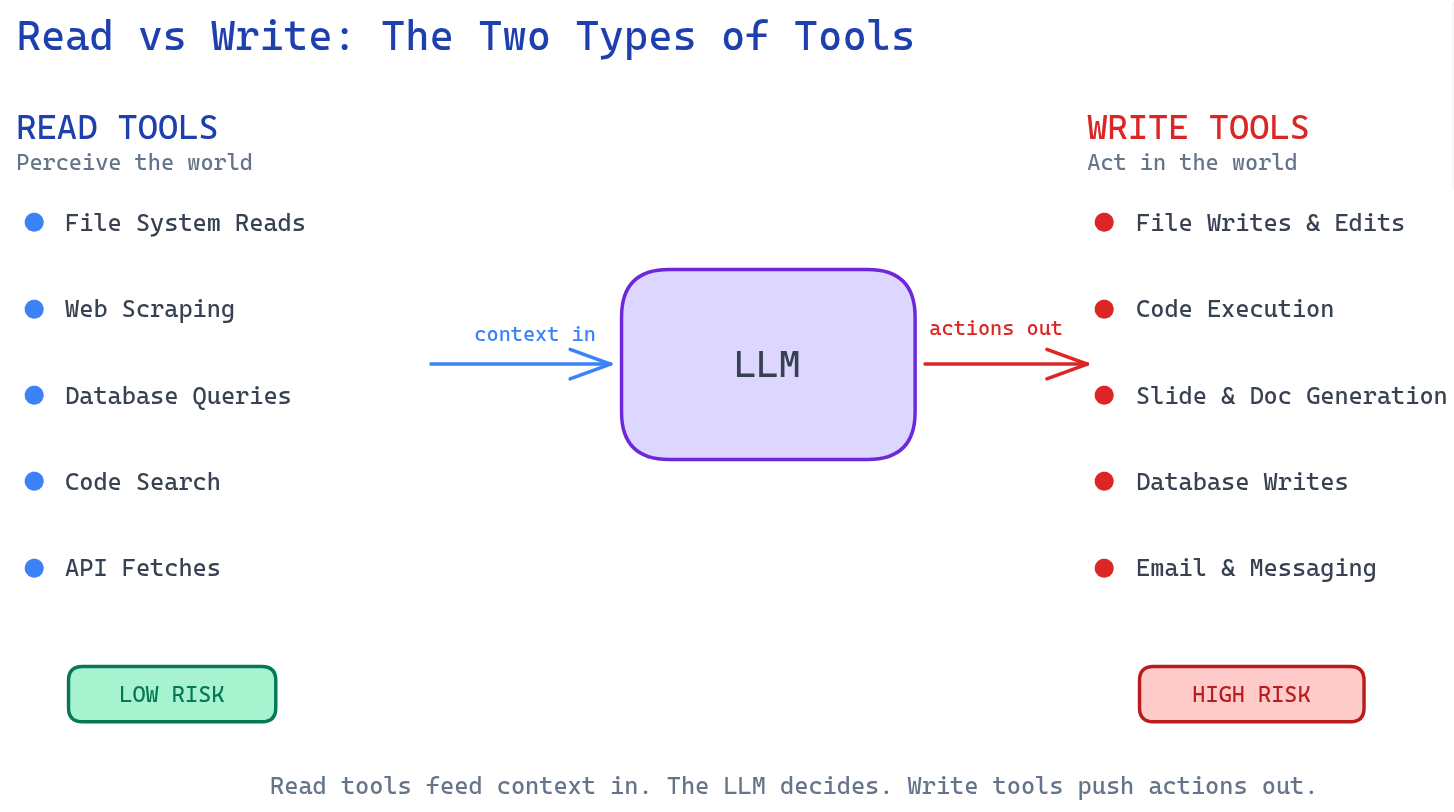
Read Tools — Perceiving the World
These tools gather information and feed it into the LLM's context window. They let the model see what's happening outside its training data.
File system reads read source code, configs, logs. This is what Claude Code uses to understand your codebase before suggesting changes.
Web scraping fetches and extracts content from any URL. Manus uses this to gather research data from across the internet.
Database queries translate natural language into SQL and fetch structured data from production systems.
Code search runs grep, ripgrep across repositories. Find every place a function is called, every file that imports a module.
API fetches pull real-time data from any service: stock prices, GitHub issues, Jira tickets, Slack messages.
The risk is low. Reading doesn't change anything. At worst, you get wrong information. These tools are the backbone of RAG (Retrieval-Augmented Generation) and any system that needs up-to-date context. [1][4]
Write Tools — Acting in the World
These tools take actions in the real world. They let the model do things, not just know things.
File writes and edits create new files, modify existing code, generate entire projects. This is how Claude Code ships real changes to your codebase.
Code execution runs Python, JavaScript, Bash in a sandboxed environment. Manus uses this to build and test prototypes live.
Slide and document generation creates PowerPoint decks, writes reports, formats spreadsheets. This is what makes Manus deliver polished outputs, not just text.
Database writes insert, update, or delete records in production systems.
Email and messaging sends emails, posts to Slack, creates GitHub PRs. Claude Desktop with MCP can do all of this today.
The risk here is real. Actions are often irreversible. An email sent to the wrong person can't be unsent. A deleted database row can't be recovered (easily). This is why write tools always need careful design — and ideally, a human in the loop. [1][4]
Think of it this way: Read tools are the eyes and ears. Write tools are the hands. Both are essential, but you need to be a lot more careful with the hands.
Best Practices (The Stuff That Actually Matters)
After going through the research and building tools from scratch, here are the patterns that separate good tool design from bad:
Descriptions are everything. The description field in your schema is the only thing the LLM has to decide which tool to use. "Search for a regex pattern across all files in a directory" tells the model exactly when and how to use a tool. "Find information" is ambiguous — the model might confuse it with other tools. Think of the description as the system prompt of the tool itself. [1][3]
Keep the number of tools small. Accuracy drops as you add more tools. OpenAI recommends keeping under ~20 tools visible at once. If the model has to choose between 5 tools, it'll pick the right one most of the time. If it has to choose between 50, confusion sets in. More tools = more noise = worse decisions. [2][3]
The Intern Test. This one comes straight from OpenAI's best practices: if you gave an intern nothing but the tool's name, description, and parameter schema, could they correctly use it? If not — if they'd have questions — then your tool definition isn't good enough. Add the answers to those questions into the description. [3]
Watch out for context overflow. Every tool schema you include eats into your context window and token budget. If you have 30 tools with detailed schemas, you might be spending more tokens on tool definitions than on the actual conversation. [4]
Model hallucinations are real. Sometimes the model will output a function name that doesn't exist. Or it'll call the right function but with the wrong arguments. This is why parsing and validation matter — always handle the case where the model returns something unexpected. [4]
The Next Step: MCP — Standardized Tools
Here's where things get interesting. Tool calling works. We've built it from scratch. But there's a problem in production: every provider does it differently.
OpenAI has its function calling format. Anthropic has its tool use specification. Google has its own way. Each framework — LangChain, CrewAI, AutoGen — adds its own abstraction layer on top.
A tool you write for OpenAI won't work with Anthropic. A LangChain tool won't work with another framework. You're rewriting the same integrations over and over.
MCP (Model Context Protocol) is the answer to this fragmentation. The equation is simple:
MCP = Tool Calling + Standardization
One protocol to connect any AI to any tool. No more custom integrations per provider. No more rewriting tools when you switch models.
I wrote a deep dive on this: MCP = Function Calling + Standardization (Just for Tools) — if you want to understand how standardization changes the game, that's where to go next.
MCP deserves its own article. Here, I just want you to know it exists — because it's where tool calling is heading.
Conclusion
Let's tie it all back to where we started.
Aristotle was right. The intelligence isn't in having hands — it's in knowing how to use them well. And that's exactly what's happening with AI.
Look at the most impressive AI products today — Claude Code, Manus, Claude Desktop. What makes them powerful isn't just the model. It's the tools. Claude Code without file system tools is just a chatbot. Manus without web scraping and code execution is just a text generator. The tools are what transform a smart model into a capable agent.
We've seen that tool calling is technically simple. It's not some deep architectural mystery. The model generates a JSON function call instead of text. Your code executes it. You send the result back. The model responds. That's the loop. Five steps. No magic.
We built it from scratch — no frameworks, no abstractions — because understanding the raw mechanics is what lets you debug, optimize, and build better tools when things go wrong in production.
We learned that tools come in two flavors: read (perceive) and write (act). Both are essential, but write tools demand caution.
And we saw that the real complexity isn't in calling tools — it's in designing them well. Clear descriptions. Focused scope. The intern test.
Yes, other pieces matter — context engineering, model quality, software engineering practices, sandboxing, memory systems. But tools are the bottleneck. Without tools, all that intelligence has nowhere to go.
The best AI engineers are not the ones who pick the biggest model. They're the ones who design the best tools.
Because without tools, an LLM is just a brain in a jar.
With tools? It has hands.
Sources
DecodingAI — Tool Calling From Scratch to Production: The Complete Guide
PromptingGuide — Function Calling
OpenAI — Function Calling Guide
Mercity — Guide to Integrating Tools and APIs with Language Models
Enjoyed this article? Share it!